How I Stay updated with CVEs

How I stay updated with CVEs?
Introduction
Assalamu Alaikum Wa Rahmatullahi Wa Barakatuh. Hope you all are doing well. In this writeup, I will be sharing my approach to stay updated with the latest Common Vulnerabilities and Exposures. So let’s begin.
What is the CVE or Common Vulnerabilities and Exposures??
Common Vulnerabilities and Exposures (CVE) is a standardized system designed to identify and categorize publicly known vulnerabilities in software and hardware. Each vulnerability is assigned a unique identifier, known as a CVE ID, which follows the format “CVE-Year-Number” (e.g., CVE-2023-12345). This system is managed by the MITRE Corporation and is widely recognized across the cybersecurity industry. The purpose of CVE is to provide a common reference for discussing and addressing security flaws, enabling organizations, researchers, and security professionals to collaborate more effectively in mitigating risks. While CVE focuses on identification, it works in conjunction with systems like the Common Vulnerability Scoring System (CVSS), which rates the severity of these vulnerabilities. By providing a unified way to reference security issues, CVE ensures consistency and helps streamline the vulnerability management process.
What is the use of CVE??
The use of CVE lies in its role as a standardized system for identifying and categorizing vulnerabilities in software and hardware, making it a critical tool in cybersecurity. Here are the primary uses:
- Vulnerability Identification: CVE provides a unique identifier for each publicly known vulnerability, allowing security professionals to reference specific issues consistently across different platforms, tools, and databases.
- Improved Communication: By standardizing vulnerability naming, CVE helps researchers, developers, and organizations communicate more effectively about specific security flaws, reducing confusion caused by different naming conventions.
- Risk Prioritization: Organizations can use CVE to identify vulnerabilities in their systems and prioritize remediation efforts based on the severity or criticality of the identified issues. This is often done in conjunction with CVSS scores.
- Automation: Many security tools and patch management systems use CVE identifiers to automate vulnerability detection and patching processes, helping organizations maintain secure environments without manual intervention.
- Tracking and Reporting: CVE allows organizations to track known vulnerabilities over time, facilitating reporting and monitoring for compliance, auditing, or risk management purposes.
By providing a common language for describing and addressing vulnerabilities, CVE enhances the efficiency of cybersecurity practices, improves communication, and supports proactive risk management across industries.
Now it’t time fot the fun part and It’s time to answer the questin How I stay updated with CVEs? For this task we are going to use the Shodan’s CVE Database and some command line trick. Here is the command.
1
curl https://cvedb.shodan.io/cves | jq | grep "cve_id"
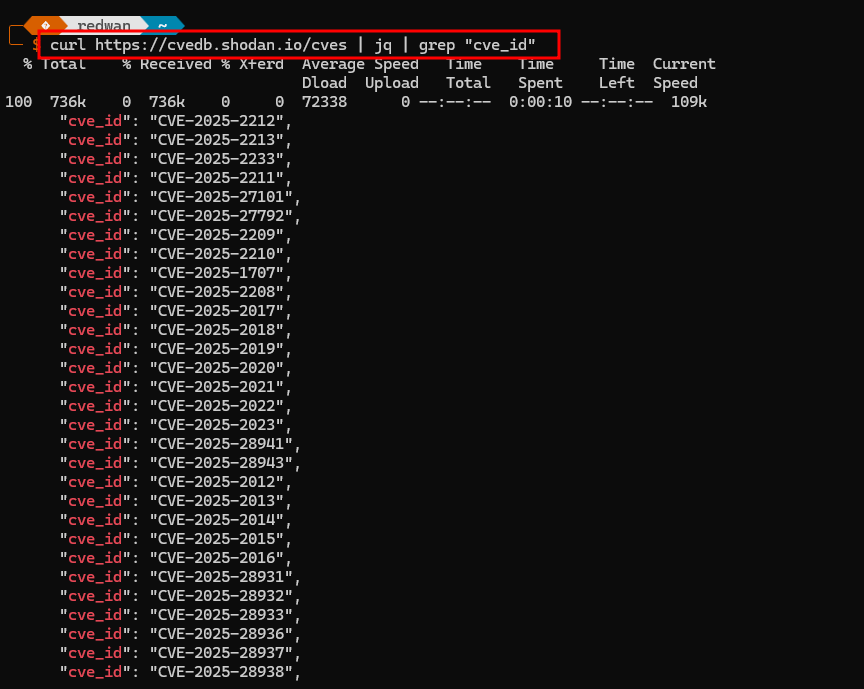
Wait!!!!!!!!!Wait!!!!!!!!!Wait Dont’ Go and Read full article. Because this part is more importent. Now that we know the command and saw the result let’s break-down the command.
Breaking Down the command.
1
curl https://cvedb.shodan.io/cves | jq | grep "cve_id"
The command is designed to retrieve a list of CVEs (Common Vulnerabilities and Exposures) from a Shodan database, format the output, and filter for specific CVE IDs. Here’s a breakdown of each part:
1
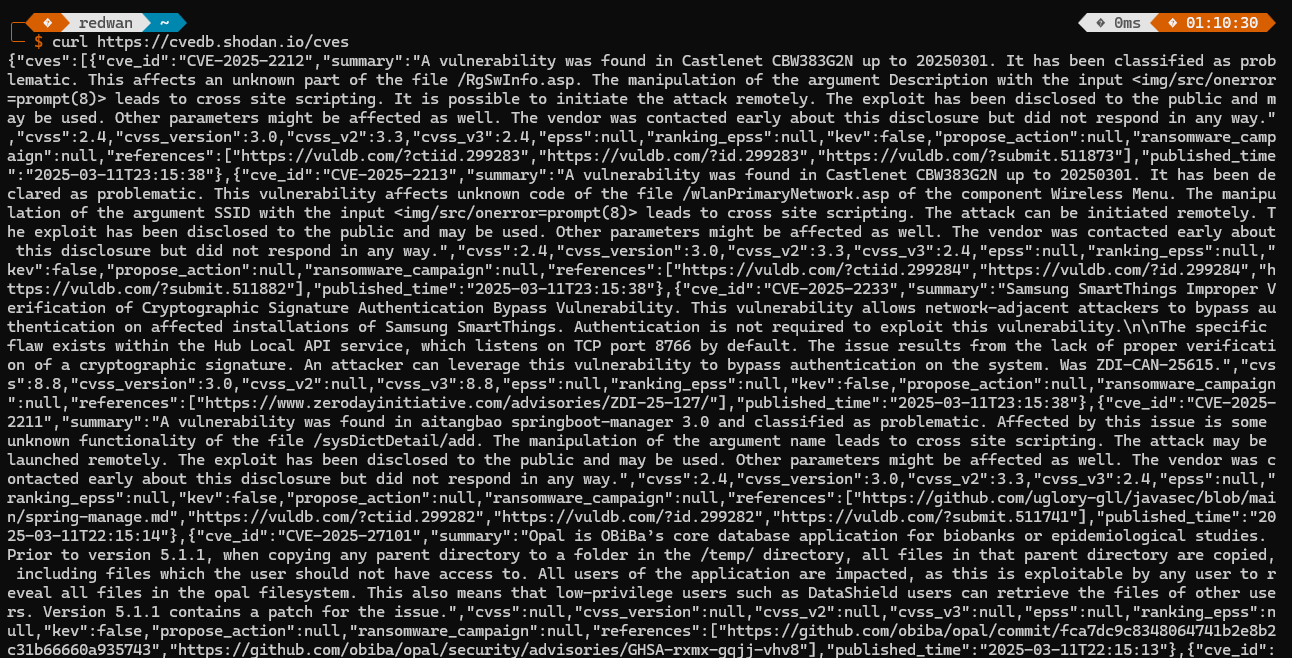
curl https://cvedb.shodan.io/cves
This part uses the command to make an HTTP request to the URL which likely returns a list of CVEs in JSON format. curl retrieves the raw data from the Shodan CVE database.
1
| jq :
The pipe |takes the output from the curl command and passes it to jq, which is a command-line tool for processing JSON data. This will pretty-print the JSON output, making it easier to read and work with.
1
| grep "cve_id"
The final part of the command pipes the formatted JSON output to grep, a command used to search for specific strings in the input. In this case, it searches for any lines containing the string “cve_id”, which is the field where CVE identifiers are stored.
Overall Function:
This command fetches the latest CVE data from Shodan, formats it into readable JSON, and then extracts only the lines that include CVE IDs, allowing you to see a list of the vulnerabilities by their unique identifiers.